
The recent massive pricing crisis surrounding Unity forced a lot of developers to frantically search for new game engines. While the situation caused immense stress, the silver lining is that many developers discovered powerful, open-source alternatives they had previously ignored. If you have a strong background in Unity, transitioning to Stride might be one of the smoothest leaps you can make.
What is Stride?
Stride is a completely free, open-source game engine. Its DNA traces back to Silicon Studio, meaning it carries the heavy legacy of Silicon Graphics (SGI). The engine originally launched under the name Paradox, was later rebranded as Xenko, and eventually went fully open-source under the highly permissive MIT license. Because it was originally engineered as an engine capable of handling AAA-style demands, its graphical rendering pipeline is incredibly mature. I once tried to build a custom renderer for an indie engine from scratch and it was a technical nightmare; seeing an open-source engine with this level of graphical maturity out of the box is a massive relief.
Platform support and development tools
The biggest roadblock with Stride is that its editor and core development tools run exclusively on Windows. Everything is deeply tied into the .NET and Windows ecosystem. If you do all your coding on a Mac, this is a complete dealbreaker for you right now.
However, if you are fine using a Windows machine, the engine can deploy your game to a wide variety of targets:
- Major mobile platforms
- Major desktop platforms
- VR headsets
Under the hood, your entire project is literally just a Visual Studio solution file (.sln). Because of this, you can easily adopt a pure code-first approach if you despise visual editors.
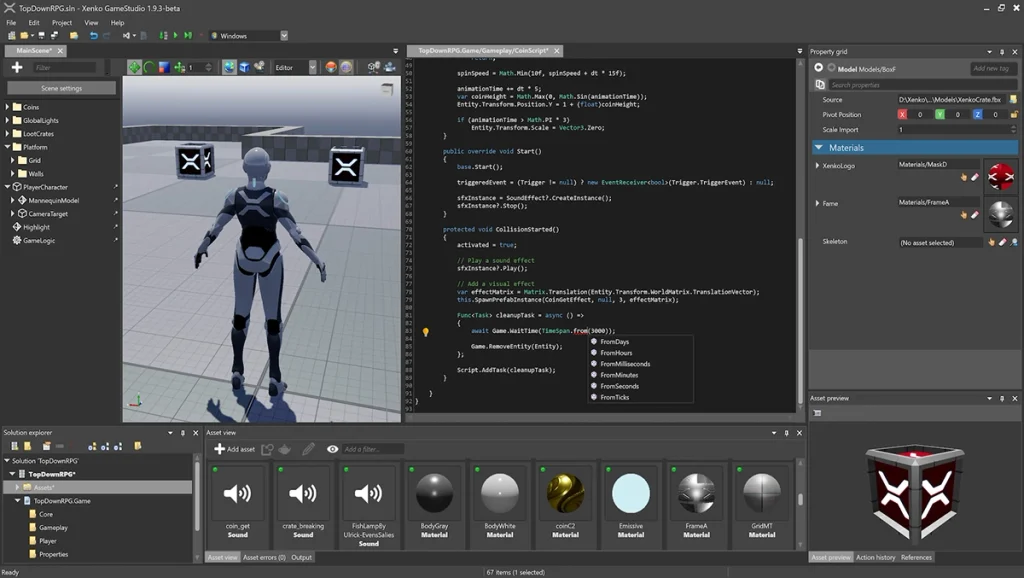
Editor interface: familiar territory for Unity users
If you are coming straight from Unity, opening Stride feels like putting on a familiar pair of shoes. The core components line up almost perfectly:
- Scene graph: Lists every single object sitting in your active world.
- Property grid: This is the exact equivalent of Unity’s Inspector.
- Entity: This does the exact same job as a Unity GameObject. It has an ID and a position in space, and you attach components—like a UI layout or a script—directly to it.
- Asset view: Mirrors Unity’s project browser.
You can also drag, drop, and snap all the tabs around the screen, allowing you to completely customize your workspace.
Scripting: deep C# integration
You write your game logic by dragging and dropping C# scripts. The engine relies on two main types of scripts:
- Synchronous scripts: These follow the traditional structure you are probably used to. They rely heavily on callbacks like Start, Update, and Cancel.
- Asynchronous scripts: These are managed through Execute and Cancel functions, behaving much closer to Unity’s job system logic.
The integration between Stride and C# is incredibly tight. If you declare a public variable in your script (like a pitch or yaw multiplier), it automatically pops up in the editor’s property grid without you having to write any custom editor code. I always hated writing tedious custom inspectors in other engines, so this is a huge win.
You also have extreme flexibility when it comes to editing your code:
- You can open the built-in code editor straight inside Stride. This speeds up your workflow so much that it makes you question why you ever needed tools like Script Inspector in Unity.
- You can open the raw project in Visual Studio.
- You can use any editor that reads
.slnfiles, including Rider and Visual Studio Code (provided you have the C# Dev Kit installed).
Graphics and rendering capabilities
Stride is a powerhouse when it comes to graphics. The editor provides a robust suite of debug rendering options. You can easily toggle different views, like the normal map or diffuse map, to troubleshoot weird lighting bugs instantly.
Thanks to the graphics compositor, you can aggressively customize your render pipeline without having to dig into complex, low-level engine code. You can even inject custom code blocks directly into the pipeline via scripts.
Some standout graphical features include:
- Direct3D 11 support, with solid additions for DirectX 12 and Vulkan
- Light probes
- PBR (Physically Based Rendering) materials
- Complex particle systems
- Its own custom shader language built directly on top of HLSL
- Multi-texturing support
- Full animation and animation blending systems
Post-processing effects
When you tweak post-processing settings, the results update instantly in the viewport. You can adjust the values by dragging sliders or punching in exact numbers. The built-in effects include:
- Fog
- Ambient occlusion
- Local reflections
- Bloom
- Depth of field
- Outline (perfect for cel-shaded or comic book styles)
Does Stride support prefabs?
The very first question any Unity developer asks when looking at a new engine is: does it have prefabs? Yes, it does, and they work flawlessly. You can right-click a prefab and hit “open prefab in editor” just like you are used to. For instance, if you inspect a standard character prefab, you will see it built out of nested sub-components like the character mesh, a hit target, and attached VFX.
Nested prefabs—a feature Unity took years to finally implement properly—work right out of the box here. You can also build UI elements as prefabs and reuse them endlessly across your project.
Sample projects and templates
Stride provides a solid chunk of resources to get you started. They showcase a massive demo called Star Breach, which specifically highlights how to load a world in separate chunks. You can slice your game into pieces and dynamically load and unload them to save memory. This scene streaming feature is an absolute lifesaver if you are trying to build massive, highly detailed environments without melting the player’s RAM.
Right from the launcher, you can grab several ready-to-use templates:
- Top-down RPG
- Third-person platformer
- VR template
- First-person shooter
- Mobile-first game templates
They also offer smaller samples that teach you how to handle physics integration and raw input handling. If you want to tear apart a completed project to see how it works, they provide:
- Jumpy Jet: A straight-up Flappy Bird clone
- Space Escape: A solid breakdown of how to build a 2D game in the engine
There is also a relatively new learning scene originally shown at GDC a couple of years ago that focuses heavily on animation systems.
2D development limitations
Stride does support 2D game development, but the specific 2D tools are fairly limited. It has a sprite editor, making 2D and 2.5D development entirely possible. However, if you rely heavily on built-in tile map editors, you will likely hit a wall here and have to build your own workaround.
Other notable features
- A full-blown scene editor that feels incredibly similar to Unity
- A dedicated, separate UI editor
- Robust curve editing tools
- AI navigation and pathfinding tools
- Out-of-the-box VR support
- .NET hot reload support (so you don’t have to restart the game to see code changes)
- Solid, highly readable documentation
Transition guide for Unity developers
The team behind Stride clearly knew their target audience. Their official documentation includes a page specifically titled Stride for Unity Developers. This acts as a Rosetta Stone, translating Unity terminology directly into Stride terminology:
- Inspector → Property grid
- Project browser → Asset view
- Hierarchy → Entity tree
- Scene view → Scene editor
- GameObject → Entity
- MonoBehaviour → Sync script, async script, or startup script
The Solution Explorer pulls directly from your Visual Studio project structure. Additionally, right in the middle of the Unity pricing meltdown on September 14, the Stride team quickly published a short document breaking down the core differences between the two engines and highlighting Stride’s top-tier features.
What are Stride’s weaknesses?
Stride is not flawless, and there are some massive caveats you need to consider before jumping in:
- No proven track record: It lacks the massive catalog of wildly successful, shipped games that Unity boasts. This is a huge red flag if you are seeking a battle-tested engine.
- Slow official releases: Because it is open source, you can always compile the absolute latest version directly from the source code. However, it has been over a year since version 4.1 dropped. Version 4.2 is supposedly coming next month, but major releases need to happen much faster.
- Launcher stagnation: While tiny code updates trickle in regularly, the launcher and editor are still stuck on version 4.1.
- Windows only tools: I mentioned this earlier, but it is worth repeating—if you develop on a Mac, you are completely locked out of the editor.
The slow public development pace suggests that a massive chunk of the work is likely happening behind closed doors. We will see just how massive the 4.2 update actually is when it drops.
Community and getting started
Following the Unity backlash, Stride experienced a massive surge in community activity. There is an active Discord server where you can ask highly technical questions and actually get answers.
You manage your projects entirely through the Stride launcher. The launcher handles downloading different engine versions and gives you instant access to all the templates. Technically speaking, Stride currently runs on C# 10 and .NET 6. Upgrades to C# 11 and .NET 7 are expected to drop next month.
Who is Stride for?
If you are desperately looking for an exit ramp away from Unity, Stride offers one of the smoothest transitions available. With its familiar entity structure, robust prefab support, deep C# scripting, and highly recognizable interface, it feels incredibly similar to the Unity environment you already know. The cherry on top is that it is MIT licensed, totally open-source, and entirely free.