
If you are a mobile developer looking to break into 3D game development without abandoning your existing tech stack, the latest tools in the Flutter ecosystem are worth your attention. Flutter is a powerhouse cross-platform GUI framework heavily utilized across Google. You can spot it everywhere, from simple cross-platform games to heavy-duty casino software, banking apps, and massive internal tools like Google Pay, Google Earth, and Google Ads. While the game development scene within Flutter is admittedly small, a brand new 3D game engine named fcene.dev has hit the market and is generating serious buzz.
Brief look at Flutter and Dart
Behind Flutter sits the Dart programming language. Dart’s original mission felt very similar to Microsoft’s approach with TypeScript—trying to tame and improve the wild landscape of JavaScript programming. However, over time, TypeScript and Dart carved out entirely different paths. Dart’s massive surge in popularity is almost entirely tied to Flutter’s success. Writing Dart code is a fantastic option if you want to embed UI elements directly into your logic. I remember testing my first Dart script right in my browser using DartPad, completely bypassing the nightmare of setting up a local development environment.
On the gaming side, Flame is the reigning champion. It is a strictly 2D game engine built entirely on top of Flutter, deploying seamlessly to mobile, desktop, and web environments. While it is the most popular choice, it is limited to 2D.
For 3D development, Fluorite was announced late last year. Backed by Toyota, Fluorite was hyped as the first console-grade game engine fully integrated with Flutter. Written in C++, heavily relying on an Entity Component System (ECS), and boasting massive performance, it sounded like a dream. Unfortunately, since that initial reveal, updates have been practically non-existent, leaving it permanently stuck in the “more coming soon” phase.
What is fcene.dev?
fcene.dev is a free, open-source 3D game engine and framework explicitly built for Flutter development, released under the highly permissive MIT license. It is currently in active development and ships with a solid library of sample projects to get you started. It deploys everywhere Flutter deploys: iOS, Android, web, macOS, Windows, and Linux. The documentation is robust, covering every corner of the project—including tricky subjects like animation blending—showing you exactly how the code functions and what the final render looks like.
Highlighted features
- Hot reload: An absolute lifesaver that lets you see code changes instantly without rebuilding the entire project.
- Live widgets on 3D surfaces: You can literally map functional Flutter UI elements directly onto 3D meshes.
- PBR and unlit material support
- Cinematic post-processing: Includes depth of field, fog, automatic eye adaptation, anti-aliasing, and more.
- Lighting effects
- Bokeh fog: For that high-end cinematic look.
- Drop-in physics, particle systems, and VFX
- Gaussian splats support
- Runtime asset generation
- Dedicated editor (currently restricted to macOS)
Editor and platform support
Right now, the dedicated editor is only available for macOS. The development team plans to release Windows and Linux builds eventually, but for now, Mac users hold the exclusive key to the visual interface. The rest of the engine framework works flawlessly across all platforms.
The editor itself feels incredibly polished and relies heavily on a component-based architecture. You can load a single massive file and drop it in as a complete scene, and the editor automatically slices it into manageable pieces. It fully supports prefabs, allowing you to apply, create, and update instances seamlessly. You can snap components onto these prefabs—like attaching rigid body physics and tweaking the mass slider. While you can drive the entire engine strictly through raw code, the visual editor organizes all these moving parts into a much cleaner interface.
Demos and examples
The primary showcase is a slick platformer demo. You can actively tweak mechanics like jump height and walk speed using simple on-screen sliders. The graphical settings are surprisingly deep:
- Real-time global illumination can be toggled on the fly.
- Tone mapping controls allow you to switch to profiles like AGX tone mapping.
- Directional lighting can be toggled to test different shadow casts.
- Post-processing effects like color grading, bloom, vignetting, and film grain can all be adjusted in real-time.
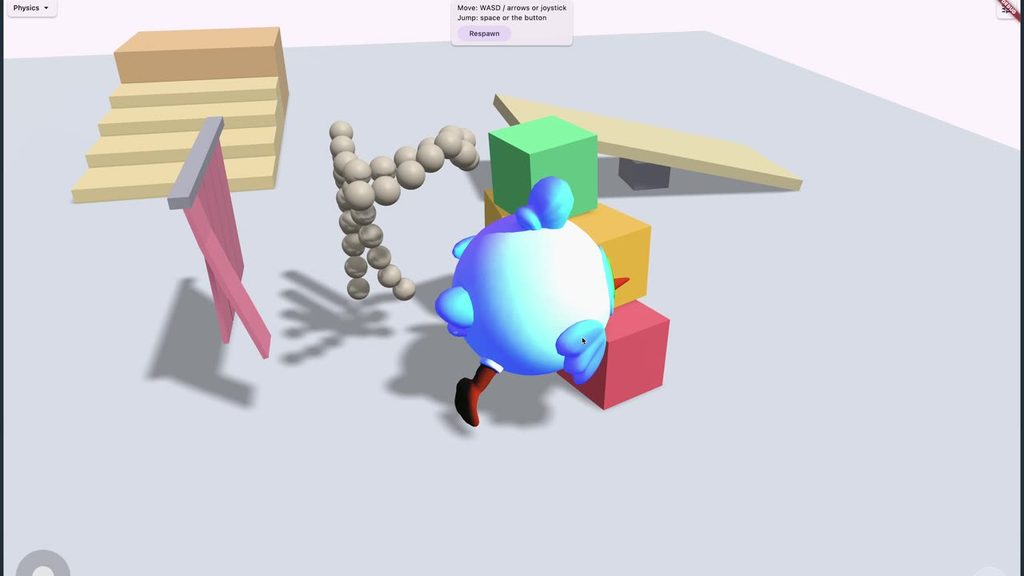
The sample library includes advanced mechanics like NPC flocking, water and buoyancy physics, a dynamic day and night cycle, cloth simulation (like flags and drapes), car physics, and raw physics playgrounds where you can run around, smash into objects, and test collision meshes. There is even a toon-shading demo, though full transparency: when I tried to run it during a live test, it completely crashed my build—but that is just the chaotic nature of live demos.
How to get started?
You can grab the entire project directly from fcene.dev. Since it is completely open-source, as long as you have your Flutter toolchain set up correctly, you just need to follow the build instructions on the site. I missed one crucial step on my first run: you must explicitly enable Flutter GPU in your runtime commands, or the engine will flat-out refuse to render.
You can leverage the framework across Windows, Mac, and Linux, but if you want to use the visual editor, you will need to boot up a Mac for now.